



VoiceNet Advanced by isp.net
Call Analytics Built Into Your Business Phone System
Live Call Dashboard, Call Insights, and Call Journey — included at no extra cost with every VoiceNet Advanced system. No add-on license. No premium tier.
What call analytics does for a business phone system
Call analytics turns the data your phone system already creates into clear dashboards and reports — who called, who answered, how long callers waited, where calls routed, and how each line performs. VoiceNet Advanced includes real-time monitoring, historical reporting, and end-to-end call journeys in the isp.net Portal.

Live monitoring

Historical insights

Call journey
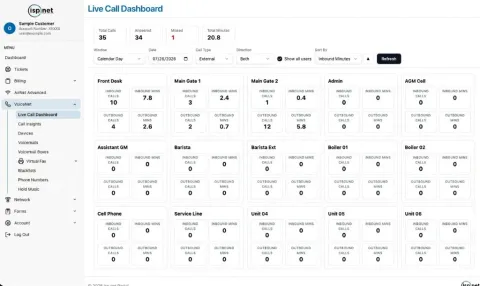
Live Call Dashboard: see every call as it happens
A real-time call monitoring dashboard — the visibility many providers sell as a wallboard or live-reports add-on — shows activity across every line and extension in one place.
Monitor every line and extension across all your locations
Whether you run one office or a chain of convenience stores, view every site and device from a single portal screen. Sort by inbound minutes, filter by call type and direction, and spot quiet or overloaded lines instantly.
Inbound and outbound calls and minutes, updated live
Each card shows inbound calls, inbound minutes, outbound calls, and outbound minutes for that line — so managers can see who is on the phone and how traffic is flowing right now.
Instant alerts when someone dials 911
Get notified when an emergency call is placed from your system — critical for multi-line businesses that need to know immediately when someone dials 911.
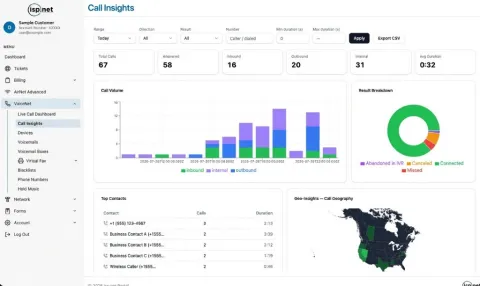
Call Insights: reporting across your entire phone system
VoIP call analytics and call reporting for the whole account — not just a single queue. Track productivity, patterns, and geography without buying a separate analytics package.
Call volume by day, hour, and line
Stacked volume charts show inbound, outbound, and internal traffic over time so you can staff for peaks and understand what each line actually does.
Connected, missed, and abandoned IVR calls
Result breakdowns surface connected calls, missed calls, canceled calls, and abandoned-in-IVR outcomes — the missed-call and abandoned-call IVR reporting managers ask for.
Top contacts, geographic insights, and CSV export
See frequent contacts, where calls come from on a map, filter by direction and duration, and export CSV when you need a deeper look outside the portal.
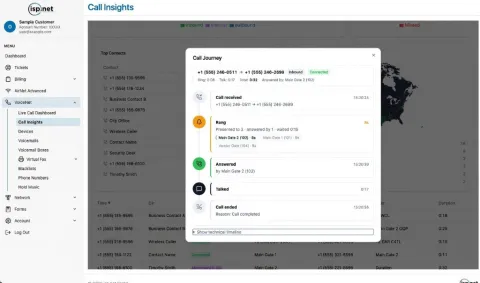
Call Journey: trace any call from ring to hangup
When a customer says nobody picked up — or a call took a strange path — open Call Journey for a step-by-step timeline. This is cradle-to-grave call reporting built into VoiceNet Advanced: every ring, hunt group, forward, and answer in one view.
See the hunt group ring path and who actually answered
Follow which extensions rang, how long they rang, and which line answered — so you can see who answered a call without guessing.
Find where calls get forwarded or abandoned
Trace IVR steps, forwards, and hangups. Use it to debug call flow, train staff, or fix routing that drops callers before they reach a person.
What other phone providers often charge extra for
Basic call history is common on business VoIP plans. Real-time call dashboards, deep call analytics, longer data retention, and full call-path (cradle-to-grave) views are commonly sold as paid add-ons or reserved for higher-priced tiers — and some vendors only offer wallboard-style monitoring inside a contact-center product.
With VoiceNet Advanced, Live Call Dashboard, Call Insights, and Call Journey are included at no extra cost. No add-on license. No separate analytics SKU. Existing and new VoiceNet Advanced customers get the full portal tools with their system.
Wallboard visibility without a contact-center license. Multi-site operators who need to see live activity and historical reporting should not have to buy a full contact center just to watch their phones.
911 call notifications and Kari's Law
Federal Kari's Law rules (47 CFR § 9.16) require multi-line telephone systems to send a notification when someone dials 911 — including that a 911 call was made, a callback number, and the caller's location information as configured for your system.
VoiceNet Advanced's Live Call Dashboard helps on-site managers get notified when an emergency call is placed, so the right people know immediately. Confirm your registered service addresses with isp.net during install and whenever a location changes — e911 accuracy depends on up-to-date location data.
Call 702.900.0000 if you need help reviewing emergency calling setup for your VoiceNet Advanced system.
Ready for a business phone system with call analytics?
VoiceNet Advanced includes Live Call Dashboard, Call Insights, and Call Journey at no extra cost — plus desk phones, IVR, and 24/7 local support.
Get a VoiceNet Advanced quote
Your name plus a phone number or email is all we need — or call 702.900.0000.